General Information
University Networking & Infrastructure (UNI) utilizes the Dynamic Host Configuration Protocol (DHCP) to manage the IP addresses across campus. All computers on campus must be registered through our DHCP Network Registration application. After connecting your computer to the network for the first time, or after replacing your Ethernet card, open a web browser. You should be automatically forwarded to the registration page. If you are not, then point your browser to https://drp.lsu.edu.
Students, faculty, and staff are allowed five concurrent registrations. Registrations are good for one year and can be managed by the end-users through the https://drp.lsu.edu website. You are allowed to view and delete registrations using this interface.
Eligibility & Order Procedures
Available To:
- LSU Faculty, Students, & Staff with a valid MyLSU ID.
- Visitors to LSU will need to contact their LSU Sponsor (Faculty or Staff Member) to receive a Temporary ID. Temporary IDs can be created online with NetGuest. The netguest site will not work from off campus.
Register a Workstation:
- Log in to https://drp.lsu.edu/. (Use your MyLSU ID & MyLSU Password)
- It IS NOT Necessary to Register your computer if you are only using the Wireless Network. (eduroam or lsuguest)
- It IS Necessary & IS Required that you Register your computer in order to connect to the Wired Network. (RJ-45 or Ethernet cable & LSU Domain)
- Consult our FAQ section below if you are experiencing issues.
Delivery Time:
- You will receive Access to the Registration Site immediately when you connect to the LSU.EDU Network.
- You will receive Access to the Entire LSU Network once your device is Successfully Registered.
The device registration portal will only allow logins of user accounts with 3 characters or more. Any user with a username of two characters or less will need to put in an itservice.lsu.edu incident request for a new sponsored account using three characters or more. Once a user has a sponsored account created, they will be able to use the device registration portal to register devices and manage registrations.
Customers in the Edward Gay Apartments
As of July 7, 2021 the LSU Eduroam wireless network is now available at Edward Gay Apartments. To gain access to the new internet service:
1. Unplug your personal wi-fi routers from both the power outlet and the data port. It is important to unplug the power cable so your router does not continue to broadcast and interfere with the community’s wireless internet connection.
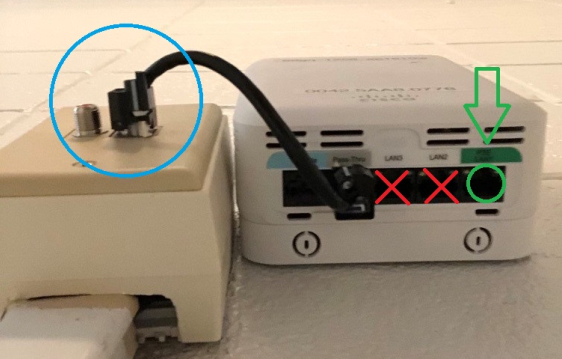
2. Plug the new wireless access point (AP) into the wall using the included cable (blue circle in photo). Any attempts to remove the included cable from the access point device or from the wall will result in damage to the access point.
3. Let the access point boot up. This usually takes about 15 minutes.
4. When the access point is done booting up, the colored light indicator on the access point will turn off. Note that there will still be some blinking lights on the bottom of the access point to show that the connection is active.
5. Now the access point is active and ready for use.
- You should see eduroam as an active wireless network on your devices. You can sign into eduroam with your LSU credentials.
- You can now plug in the device you want to use on a wired connection into the green-marked port. There should be a green label on the device identifying the correct port. Refer to the green circle in the photo above.
- Any device capable of being connected via ethernet/LAN cable should use this port, especially computers and game consoles. These devices must be registered on the Device Registration Portal (DRP), just like when you registered your router for the first time.
- Only one port is active on the access point. The other two, marked with red X’s on the photo above, are inactive.
Since you are now on the LSU wireless network, you should not reconnect any wireless routers, switches, hubs, etc. to the green-labeled port as these devices are not allowed on LSU’s network. Any other devices that can connect wirelessly should be connected to the eduroam wireless network.
- Wireless devices like smart TVs, Rokus, Firesticks, etc. should be registered on the LSU IOT network starting July 7. The LSU IOT wireless network gives you three (3) extra registrations to connect smart devices that couldn’t connect to eduroam wireless. However, if your device is capable of connecting to eduroam (computers, phones, game consoles via LAN cable), it should be connected to eduroam, not LSUIOT. Game consoles should NOT be connected to LSUIOT.
The Residential Life HelpDesk can help with any setup or troubleshooting questions regarding network registration of your device(s). If you need to contact the Res Life IT Help Desk, email reslifehelp@lsu.edu or call 225-578-0560.
For FAQs and more resources, please see the full article by clicking "More..." below.
(
More )